Patient App
Purpose
The Patient App supports patients throughout the pre-visit journey — from digital registration and dental needs assessment to appointment requests and confirmation tracking. Information submitted through the app can be reviewed by the clinic and assigned provider before the consultation.
How the Patient Journey Works
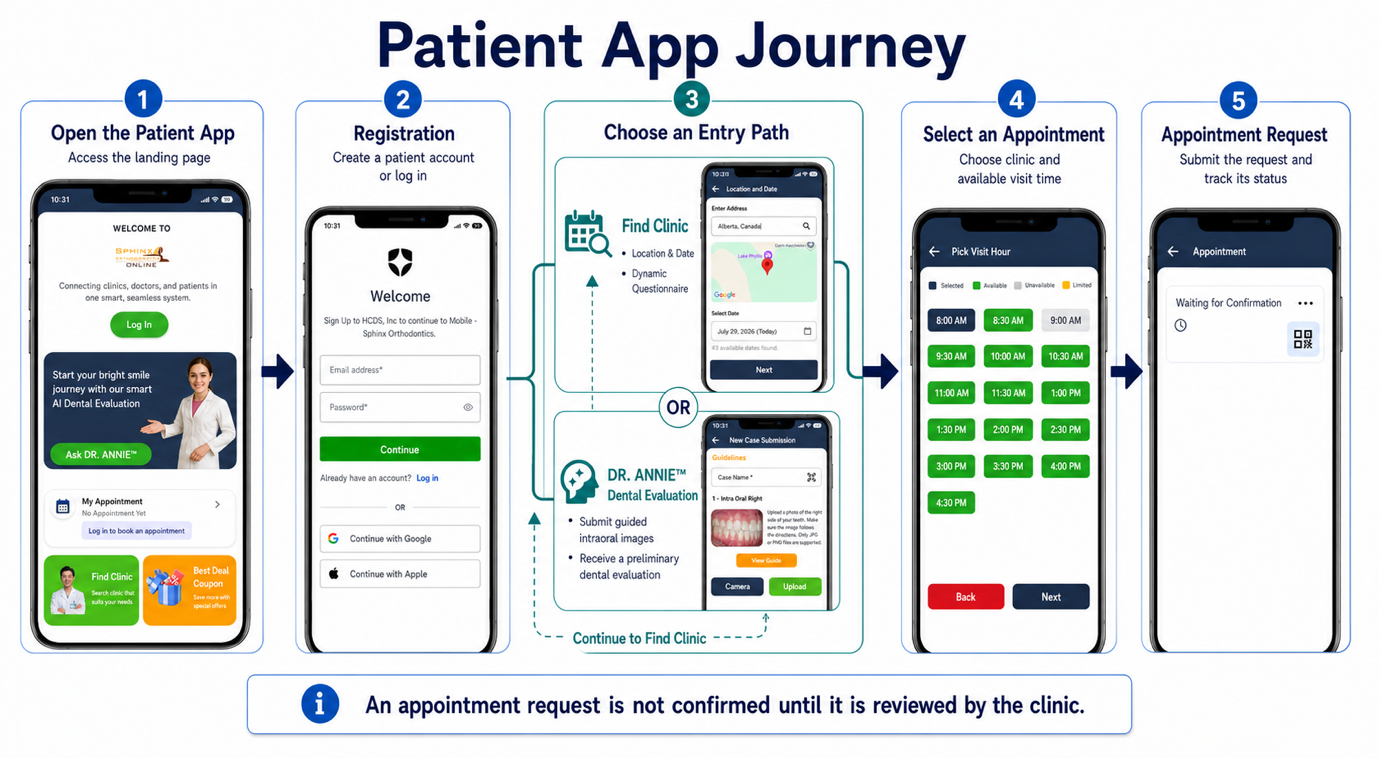
1. Open the Patient App
Access the iSmartOffice™ Patient App.
2. Register or Log In
Create a patient account or log in using an existing account.
3. Choose How to Begin
Patients can begin their journey through either of the following options:
Option A — Find a Clinic
- Enter Location and Preferred Date
- Complete the Dynamic Questionnaire
- Review Clinic Search Results
Option B — Ask DR. ANNIE™
- Submit Guided Intraoral Images
- Receive a Preliminary Dental Evaluation
- Continue to Find a Clinic
4. Select an Appointment
Choose a clinic and select an available visit date and time.
5. Submit an Appointment Request
Submit the appointment request to the clinic for review. The status will remain Waiting for Confirmation until the clinic reviews and confirms the request.
The DR. ANNIE™ Dental Evaluation Flow
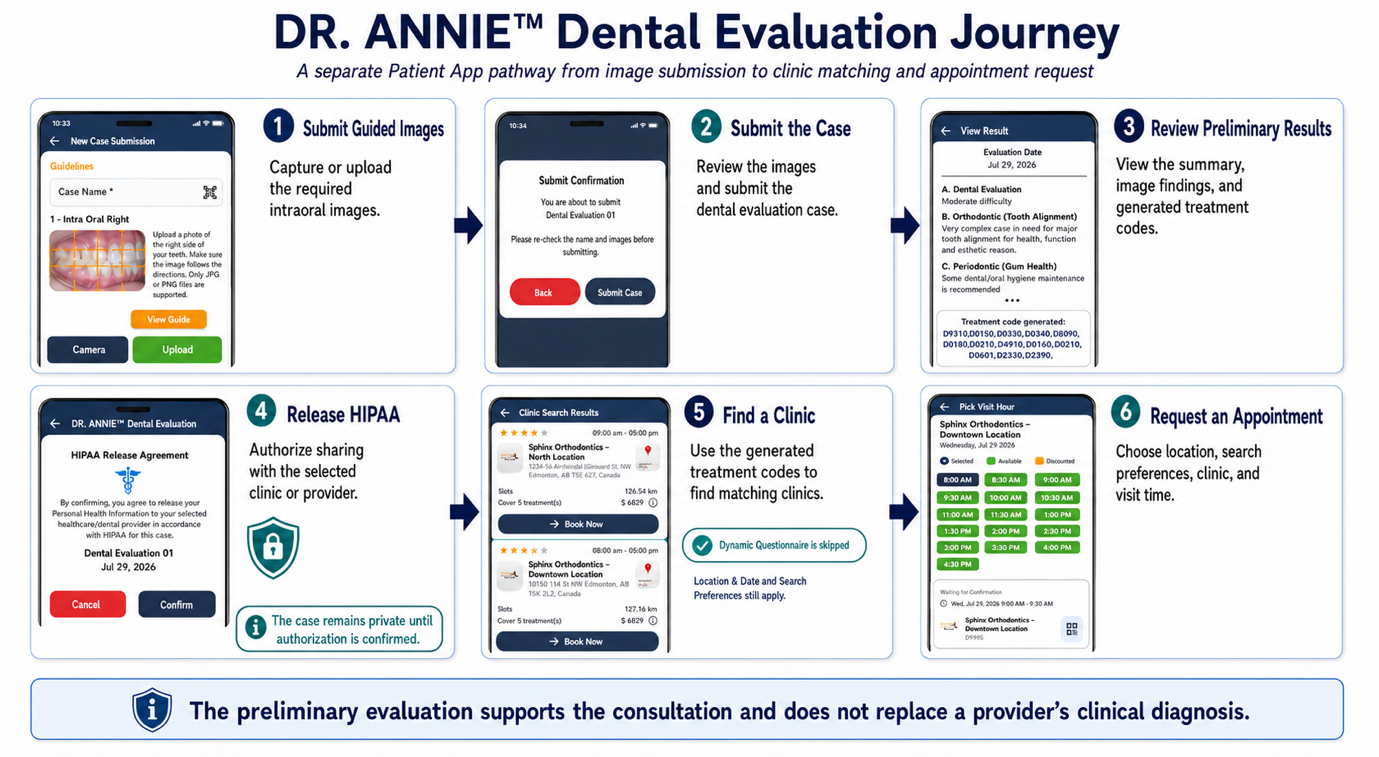
1. Upload Intraoral Images
Capture or upload the required intraoral images by following the image guidelines.
2. Submit the Case for Dental Evaluation
Review the uploaded images and submit the case for a preliminary dental evaluation by DR. ANNIE™.
3. Receive the Dental Evaluation Result Notification
The patient is notified by email and an in-app notification when the evaluation result is ready.
4. Review and Authorize Sharing
Review the preliminary dental evaluation result and complete the HIPAA Release to authorize sharing with the selected clinic or provider.
5. Find a Clinic
Search for clinics based on the treatment codes generated from the evaluation findings. The Dynamic Questionnaire is skipped for this pathway.
6. Request an Appointment
Select a clinic and submit an appointment request based on the preferred date and available time.
What Clinic Staff Should Know
- An appointment submitted through the Patient App is an appointment request and is not automatically confirmed.
- Clinic staff must review the request, verify provider availability, and assign the appropriate doctor before confirming the appointment.
- Patients who use DR. ANNIE™ may submit guided intraoral images and receive preliminary dental evaluation results before requesting an appointment.
- When patients search for a clinic using their DR. ANNIE™ evaluation results, the generated treatment codes are used to identify matching clinics. The Dynamic Questionnaire is skipped for this pathway.
- A DR. ANNIE™ evaluation remains private unless the patient completes the HIPAA Release to authorize sharing with the selected clinic or provider.
- The preliminary dental evaluation is intended to support the consultation. It does not replace the provider's clinical examination, professional judgment, or final diagnosis.
- After the clinic reviews the request, the updated appointment status becomes visible to the patient in the Patient App.
- Clinic staff should continue to use the clinic's established PMS workflow for official scheduling, clinical documentation, and patient record management.
The DR. ANNIE™ Dental Evaluation provides preliminary findings to support the patient consultation. It does not replace a provider's clinical examination, professional judgment, or final diagnosis.