Provider App
Purpose
The Provider App gives assigned dental providers mobile access to their clinic schedules, confirmed appointments, and patient-released DR. ANNIE™ dental evaluations. It connects the clinic's appointment and provider assignment workflow with the provider's clinical review and patient consultation responsibilities.
Providers can use the App to review their current schedule, access assigned appointments, review preliminary dental evaluation results and images, confirm reviewed findings, and access past visit information.
How the Provider App Connects to the Ecosystem
The Provider App receives information after the clinic completes the required review and provider assignment steps. It does not receive every appointment request or dental evaluation submitted by patients.
| Ecosystem Stage | Action |
|---|---|
| Patient App | The patient submits an appointment request and may authorize the release of a DR. ANNIE™ dental evaluation |
| Clinic Portal or Clinic App | Clinic staff review the appointment request, verify availability, accept the request, and assign the appropriate doctor |
| Clinic Portal | For a released dental evaluation, clinic staff review the case and assign it to a provider |
| Provider App | The assigned provider reviews the appointment, preliminary evaluation, and images before the consultation |
| After Provider Review | The evaluation status is updated and becomes visible to the clinic as reviewed |
Appointment assignment and dental evaluation assignment are related but separate actions. Assigning a doctor to an appointment does not necessarily mean that the dental evaluation has also been assigned for provider review.
Provider Appointment Workflow
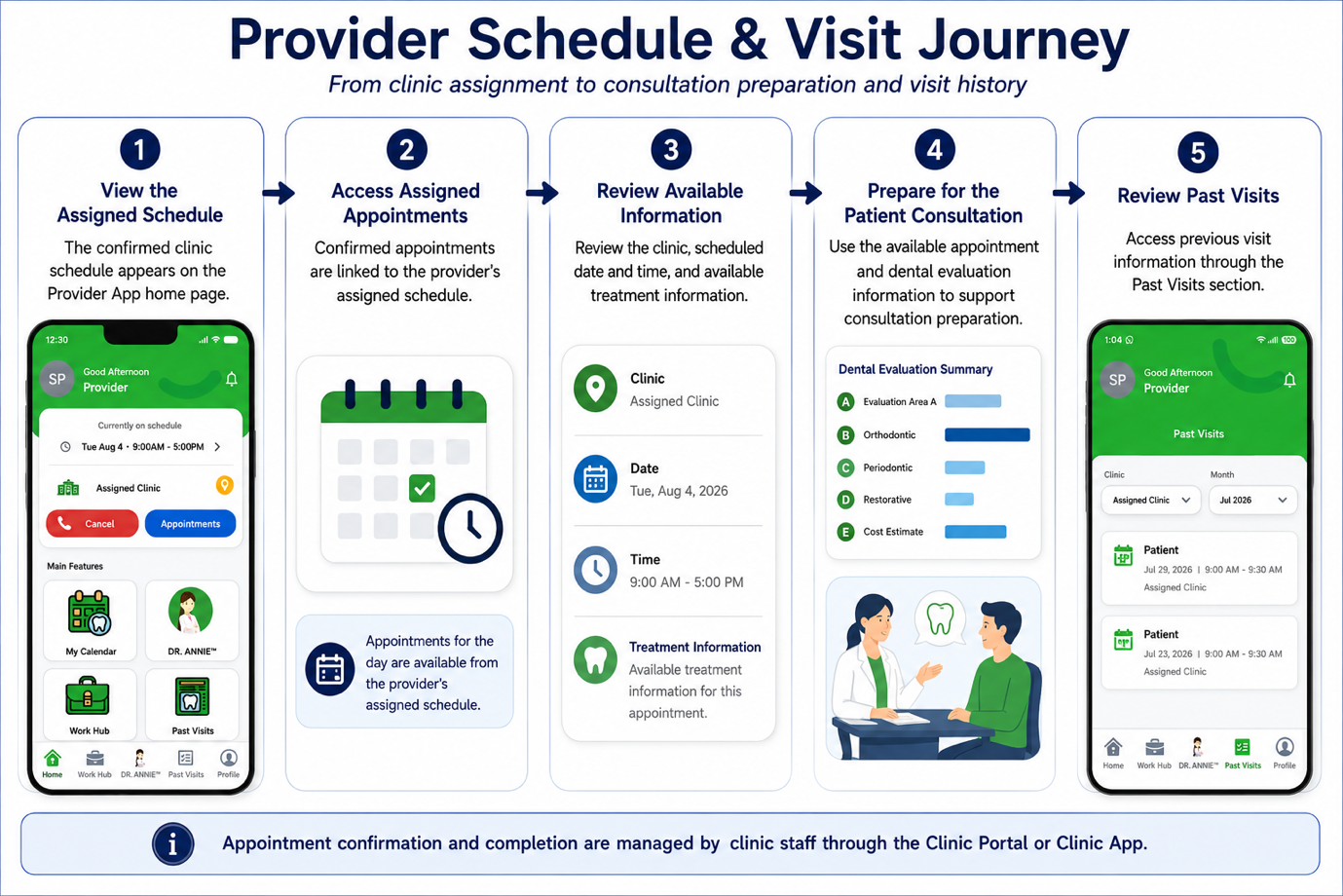
1. Receive an Assigned Schedule
Once the clinic confirms the provider's working schedule, it becomes visible on the Provider App home page and calendar.
2. Access Assigned Appointments
After the clinic accepts an appointment request and assigns the provider, the appointment becomes available in the provider's schedule.
3. Review Appointment Information
Review the patient, clinic location, scheduled date and time, and available treatment information before the consultation.
4. Conduct the Patient Consultation
Use the available patient and dental evaluation information to support the consultation and determine the appropriate clinical assessment and next steps.
5. Access Past Visits
After the visit, previous appointment information can be accessed through the Past Visits section.
DR. ANNIE™ Dental Evaluation Workflow
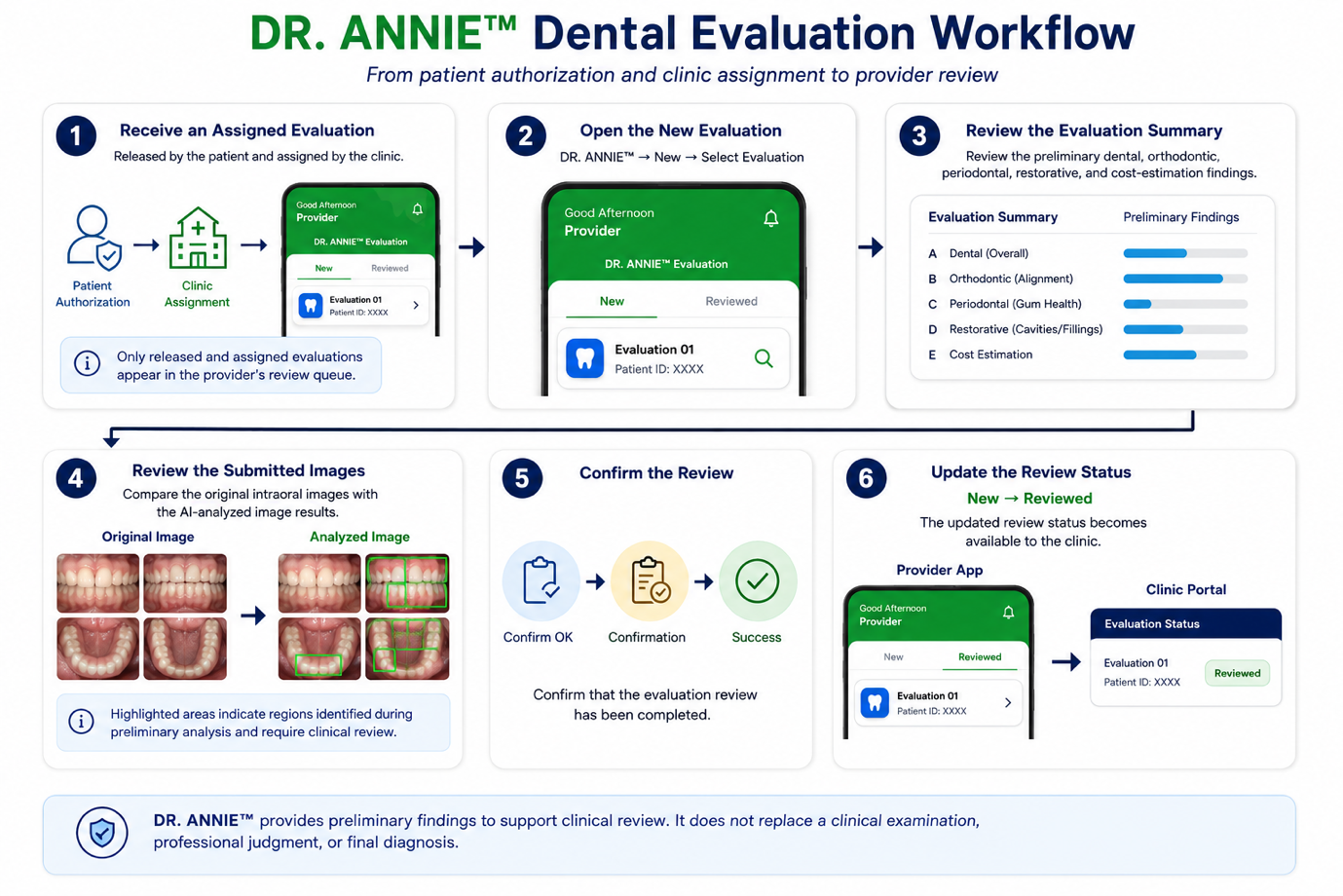
1. Receive an Assigned Evaluation
A dental evaluation appears in the Provider App after the patient authorizes its release and the clinic assigns the case to the provider.
Only released evaluations assigned to the provider should appear in the provider's review queue.
2. Open the New Evaluation
From the DR. ANNIE™ section, open the New tab and select the assigned evaluation.
3. Review the Evaluation Summary
Review the preliminary findings across the dental, orthodontic, periodontal, restorative, and cost-estimation categories.
4. Review the Submitted Images
Compare the patient's original intraoral images with the AI analysed image results before confirming the findings.
The highlighted areas indicate image regions identified during the preliminary analysis. They should be reviewed together with the original images and the provider's clinical assessment.
5. Confirm the Reviewed Findings
After completing the review, select Confirm OK to confirm that the findings have been reviewed.
6. Move the Evaluation to Reviewed
Once confirmed, the evaluation moves from the New tab to the Reviewed tab, and the updated review status becomes available to the clinic.
What Providers Should Know
- Appointments become available to a provider after the clinic reviews the request, confirms availability, and assigns the appropriate doctor.
- A patient's DR. ANNIE™ dental evaluation is only available after the patient authorizes sharing and the clinic assigns the evaluation to the provider.
- Appointment assignment and dental evaluation assignment are separate clinic actions.
- Providers should review both the original intraoral images and the AI analysed image results before confirming the findings.
- DR. ANNIE™ provides preliminary findings to support the consultation. The results do not replace the provider's clinical examination, professional judgment, or final diagnosis.
- Selecting Confirm OK records that the evaluation has been reviewed and moves the case to the Reviewed list.
- Providers should continue to follow the clinic's established PMS and clinical documentation procedures for official patient records, diagnoses, and treatment plans.
- Patient information and dental images must only be accessed for authorized clinical purposes.