Help
Tapping the Help menu will open a pop-up containing three main options:
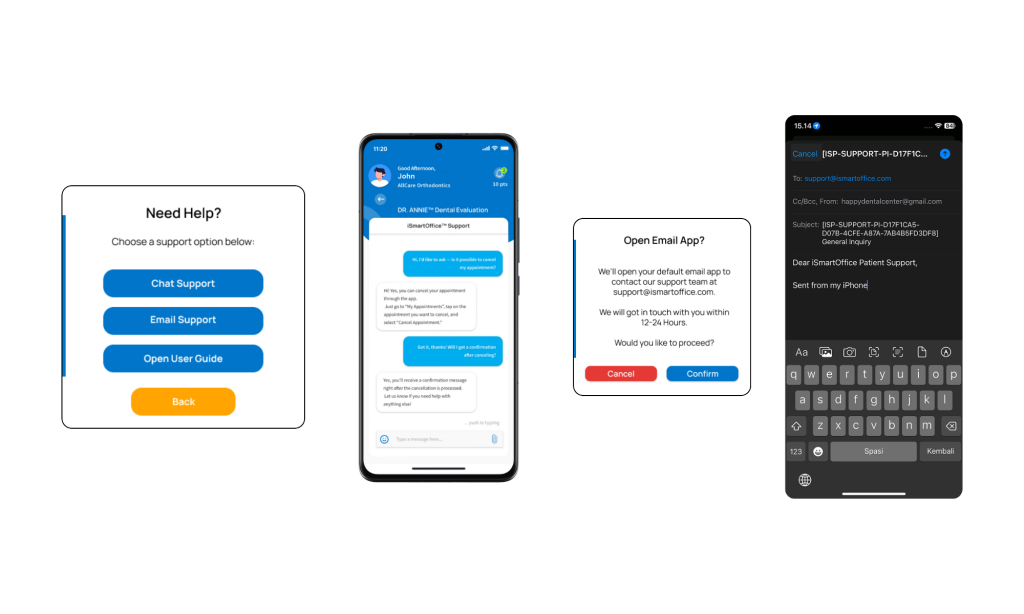
A) Chat Support This opens the chat support page, where you can directly message the iSmartOffice™ support team. Please note that due to possible time zone differences between users and the support team, response times may vary and could take several hours. For faster and more detailed assistance, you can switch to email support.
B) Email Support Selecting this option will redirect you to your device’s default email platform, with the recipient and subject line pre-filled. You can write your questions, suggestions, or feedback directly here. Our support team will reply to your message as soon as possible.
C) Open User Guide This button will take you to the iSmartOffice™ Patient User Guide — most likely, this is where you are right now. Thank you for using our guide!
Tips:
- Chat support response times may vary depending on time zone differences.
- For more detailed issues, use Email Support to include screenshots or attachments.
- Bookmark this User Guide for quick reference in the future.